Building a Fashion Try-on App with Gemini AI Studio
(Or: how I accidentally built something useful while procrastinating real work)
It started the way most spirals do, with a casual click and no real intention of doing anything serious.
Google had sent one of those polite nudges: “Come play with Gemini AI Studio!” I opened it because… why not? The email mentioned Gemini 2.5 Flash Image, which — I kid you not — goes by the nickname nano-banana. Somewhere, a product manager is very proud of that.
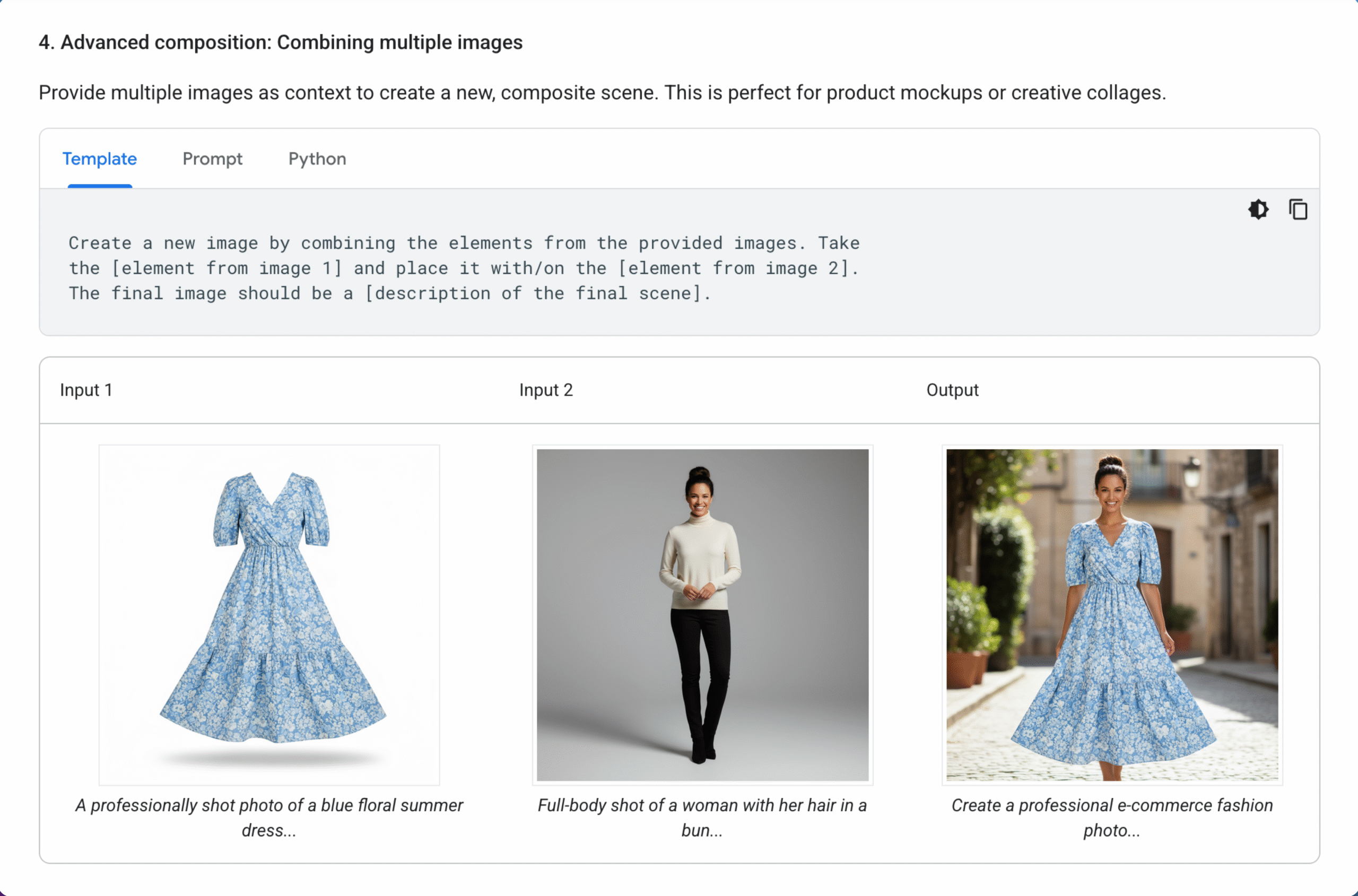
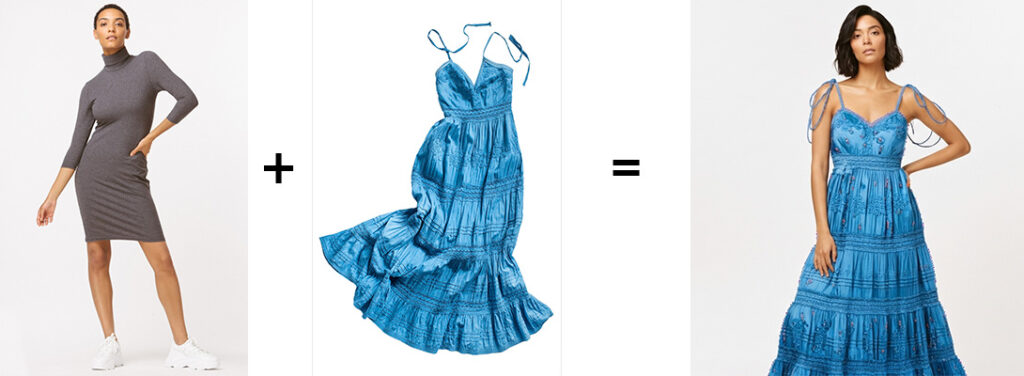
One listing in the docs caught my attention: Advanced image composition. Basically, the AI can take two separate images, such as a woman and a dress, and merge them into a realistic new photo.
They even gave the exact prompt to try it. So try, I did.
Act One: The Whisk Rabbit Hole
I started with Whisk Experiment, a fast, no-code playground by Google. Just toss in a model photo, a garment, and let the app do its thing.
And y’all.
It was giving!
Not only did it generate a composite image, it also turned it into a full-on video, complete with music and a voice-over. Whisk said, “You want me to show you Gone-with-the-Wind fabulous?”
Test One: Prompt: “The woman spins around slowly. Voice-over: ‘Shop our summer boho collection.’”
Test Two: Prompt: “The woman stands up and spins. Voice-over: ‘This dress is great for a night out or summer occasion.’”
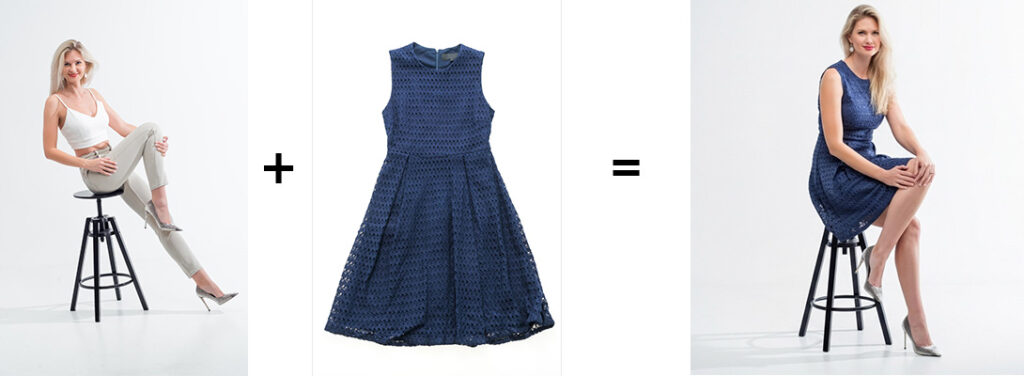
Now, I have to say it. The voice-over for each is completely different. Whisk picked up the photo representation of the woman and assigned a voice that it felt related most to that model.
The first test is giving a Caribbean islander accent voice-over. An elaboration on the dress straps and a complete change of her hair when the image was generated.
The second test has a general American accent and didn’t add additional headspace, so the model’s head is cropped out when she stands up.
That said, the results left me impressed. At this point, I was thinking… okay, this isn’t just a party trick. There’s real potential here.
So now I was curious. Like, dangerously curious.
Act Two: The Gemini Cousin Chat
I ran the same prompt in Gemini Chat, expecting at least similar results. It gave me… one static image.
No sound. No motion. Just vibes.
It wasn’t bad, just not as exciting as the full theater performance I got from Whisk. But something about that quiet output sparked a bigger idea.
Could I build an actual fashion try-on app using this tech?
And that’s when the side quest became the main plot.
Act Three: A Curious Cat
Here’s the question I needed to answer:
Can I make a simple app using Gemini to take a real photo of a person and a separate image of a garment, and generate a new image that convincingly shows the person wearing that garment?
Face intact. Pose preserved. Vibes unmatched. Not weird collage energy.
I wasn’t aiming for a fashion runway, just something that could pass in an online store scroll without the viewer being the wiser.
Act Four: The Mad Dreamhouse
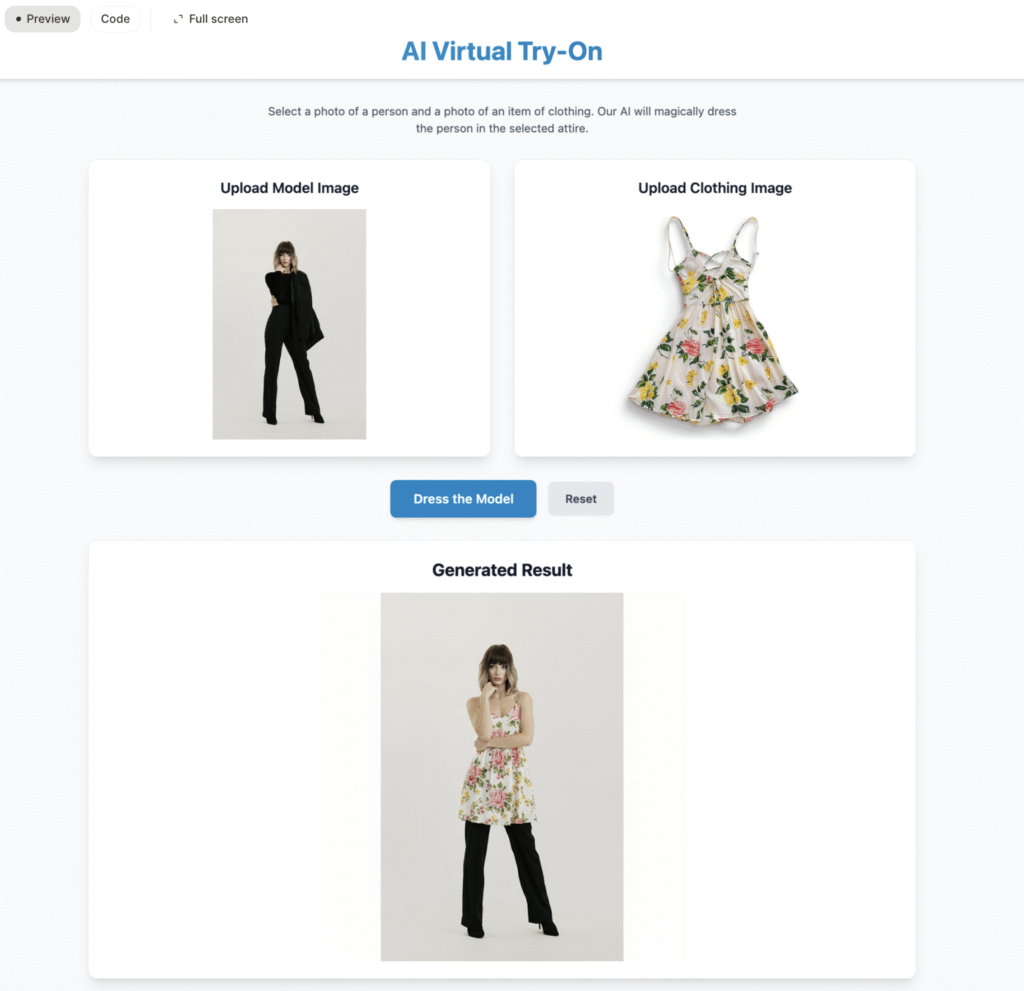
Inside Gemini AI Studio, I used Gemini 2.5 Pro to build a very straightforward app. No code. No drama. Just a clear path from input to output.
Here’s what the flow looks like:
- Upload a model image
- Upload a clothing image
- Click “Dress the Model”
- Get your result
- Use Reset if the result is cursed
That’s it. No filters, sliders, or 12-tab interfaces. I kept it intentionally barebones so I could focus on getting something to work.
And eventually… it did. But not without a fight.
Act Five: A Prompt Advisor
Let me tell you, Gemini has opinions. And most of them are filtered through a very strict sense of digital modesty.
At first, my results were all wrong. The model kept getting dressed in default gray loungewear. No matter how many times I uploaded a dress, Gemini gave me “headed to hot yoga” energy.
Turns out, phrases like “remove clothing” or “nude base” get flagged faster than you can say “content violation“.
So I had to finesse it.
Eventually, I found a workaround using a two-step prompting strategy:
- First, generate a clean image of the model — preserving her face, skin tone, pose, and lighting.
- Then, apply the garment image as if she were being styled. Not undressed and redressed, but enhanced. AI doesn’t like it when you suggest it “changes” people. Go figure.
Even that took trial and error. Finally, I got to a result that produced more upright thumbs and went with it.
Shoutout to Prompty Poppins (a ChatGPT custom bot by Lauren deVane) for helping me brainstorm prompt phrasing. Think: prompt therapy, with less “I don’t know what to do, I hate my life” and more “Let’s make it wish it hadn’t met us!”
Act Six: Who Stole the Clothes?
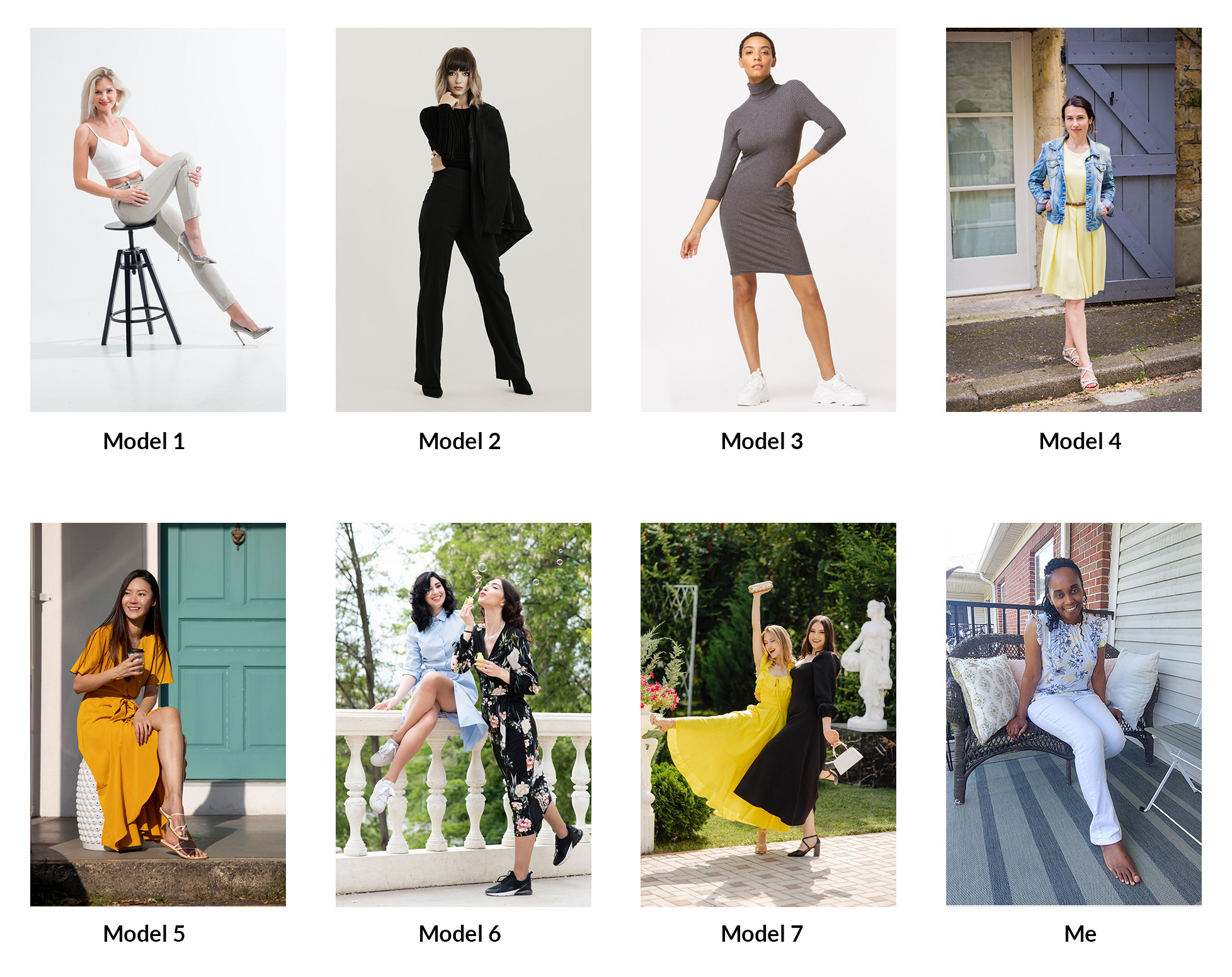
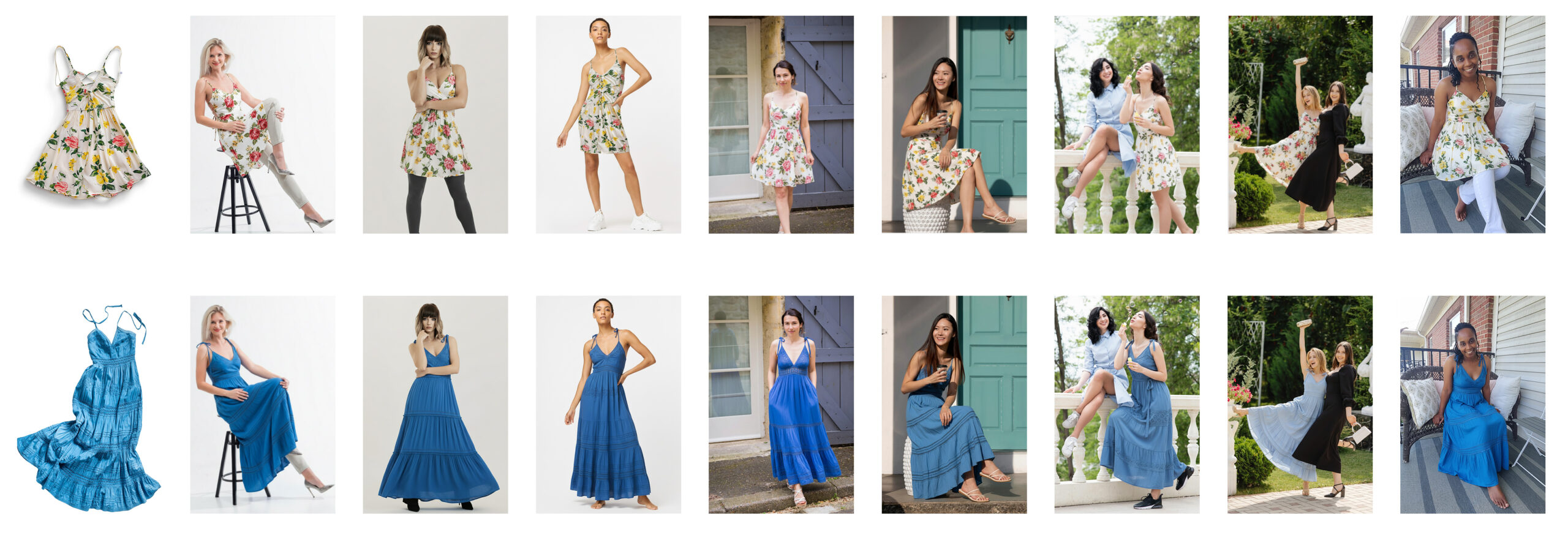
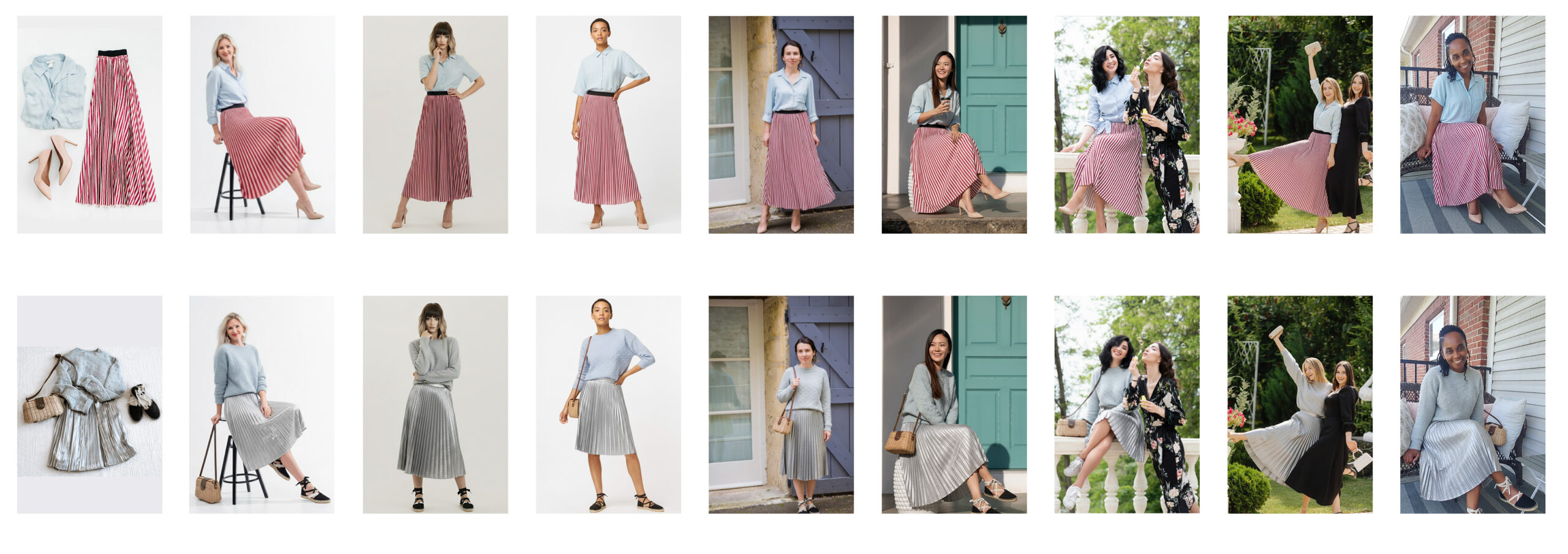
So now that I’d finally persuaded the emperor to wear new clothes, it was time to roll out the red carpet (virtually). I put the prototype to work. A test run of the same images of models and me (gotta be real), all virtually trying on the same clothes. That was my way of maintaining consistency and being science-like. (Lab coat, anyone?)
But to challenge the emperor, I used photos that were bound to produce some interesting results. I didn’t go all crazy, but I did think that someone may not have a photo suited for a perfect rendition, and went from there.
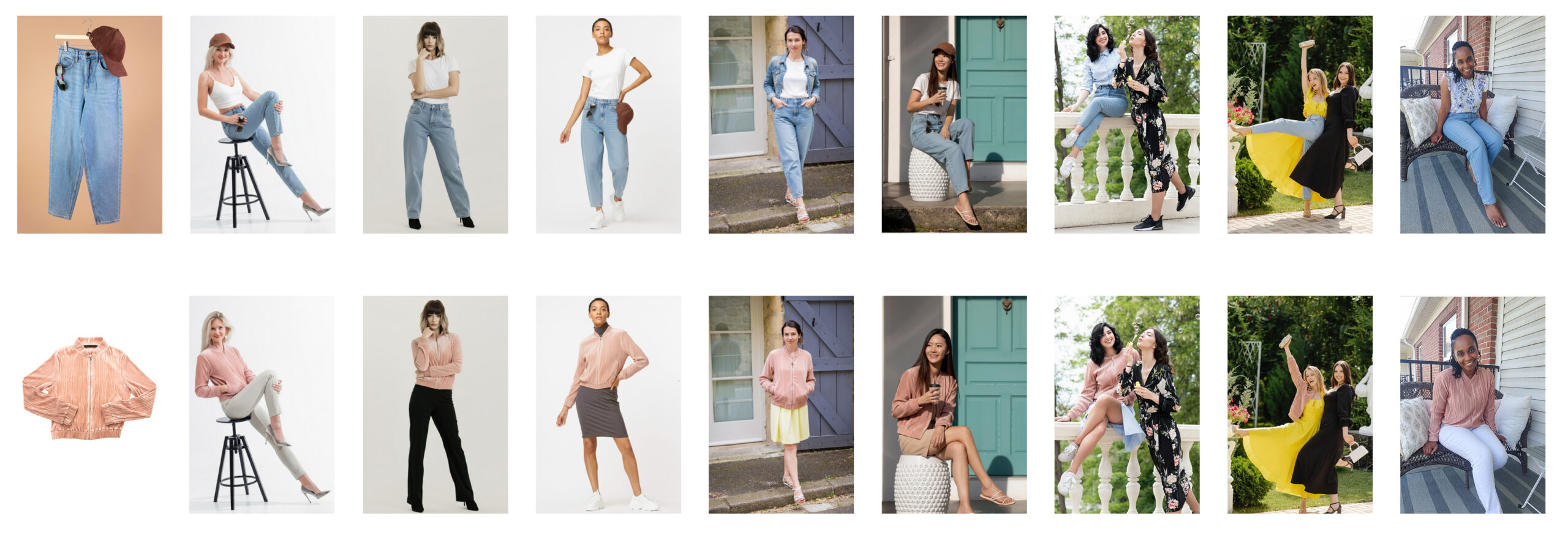
I used the same clothing items and models during the test. (click image to view larger size)
Original photos of models:
Below shows the clothing photo used and the generated photos of each model wearing the clothing.
Act Seven: The Party Drop
Let’s not pretend this was a flawless experiment. The results were mixed, sometimes surprisingly strong, sometimes deeply mediocre. But overall? I was impressed. Not in a “we’ve solved digital fashion” kind of way, but in a this is actually getting somewhere kind of way.
Some results felt ready for real use, maybe not full-blown campaigns, but definitely solid enough for consumer-level use, concepts, mockups, or internal previews. Others required a quick laugh and a Reset click.
But that’s the nature of generative AI. It’s not a “input this, get exactly that” situation. It’s a fuzzy, adjacent-based process where outcomes live on a sliding scale of almost perfect to why are her pants floating above her knees.
Still, here’s how things broke down:
The Good
Honestly, I was surprised by how well Gemini handled most of it.
There were moments when I expected an easy win — clean photo, good lighting, obvious match — and it still fumbled. And then there were times I fed it a more complicated input, fully expecting chaos, and it pulled through like a pro.
So no, there wasn’t one clear “do this and it works” pattern. But generally, starting with a high-quality image of a model wearing a sleeveless one-piece or fitted base outfit, with minimal distractions in the background, is the way to go. I ran a few of those types of inputs, and the outputs were noticeably more consistent.
If the result didn’t land the first time, rerunning it once or twice often did the trick. I didn’t let myself fall into the spiral, three attempts max before moving on.
Also — and this genuinely surprised me — Gemini would sometimes update the shadows, reflections, or even light direction to match the newly added clothing. It didn’t always get it right, but the fact that it tried? That alone felt like a glimpse of how usable this could become.
So yes, the results were mixed. But when it was good, it was really good. The kind of good where you start thinking, “I could actually use this in something real.”
The Challenges
Before I could even get to testing the app, I had to build it. And getting Gemini to cooperate behind the scenes wasn’t exactly straightforward.
The core issue? Figuring out how to prompt the model (within the app logic) to understand what I wanted it to do. At first, it was confused. It didn’t know how to merge the two uploaded images properly. Sometimes it would overwrite the model entirely or blend things in a way that made no sense.
It took a fair amount of experimenting with different prompt flows before I landed on a two-step structure: first, generate a clean version of the model image (keeping face, pose, lighting). Then, apply the uploaded garment onto that base without losing the integrity of either image. Once that clicked, the app became functional. Simple on the front-end, but very intentional in how it guides the model on the back-end.
As for the user-facing side of the app, the challenges were more subtle.
For one, the generated image is sometimes cropped differently from the original. Not broken, just reframed. So if the input image is full-body, the output might return a closer crop. The model and garment are still there, but the edges might change.
The bigger adjustment comes from understanding how the clothing renders. Gemini doesn’t always recreate the uploaded item exactly. A skirt might show up longer. A patterned top might lose detail. It’s not glitching, it’s doing what generative AI does: giving you something like what you asked for, but not always what you meant.
So no, the app isn’t unreliable, it’s just not literal.
And once you stop expecting it to act like a visual copy machine and start treating it more like a stylist with creative liberty, the entire experience makes a lot more sense.
Act Eight: The Queen’s Verdict
This thing works. At least good enough to count as an early MVP.
If I were positioning it today, I’d say it’s an app anyone could use to see how they might look in a clothing item they’re considering. A virtual try-on, no fuss, no styling crew.
Could fashion designers or retailers use it? Technically, yes. But I wouldn’t rely on it for all garment types or mockups. It’s not quite there. The inconsistencies alone would send most creative directors into early retirement.
But as a prototype? Strong.
And yes, the whole thing came together in less than a day. No dev team. No wireframes. Just me, an idea, and a handful of prompts Gemini politely refused to process.
Act Nine: Should I Keep Falling?
If I were to keep going, here’s what I’d improve next:
- Add composition controls to fix the cropping issues
- Improve garment texture fidelity so it stops guessing on fabric types
- Add upscaling for cleaner, high-res outputs
- Expand to multi-model scenes, pets, men’s and kids’ fashion
- Try lifestyle shots — casual photos vs. studio sets
- Add garment color variations because people love options
Act Ten: The Mocking Bird a.k.a TL;DR
This started as a click.
Turned into a test.
Became a working prototype.
It’s not polished. But it works.
And honestly, for one day and zero code?
That’s more than I expected from a project named after a tiny banana.